Followers

Showing posts with label Product review. Show all posts

Saturday, 25 June 2016

Ken Oliver Color Burst Product Review and Mixed Media Tag

Hi all
I have a product review using the Ken Oliver Color Burst Powders which i think is something my mixed media friends would like. I wanted to experiment with them so i have created a mixed media tag using a mixture of my stash. You can get them from That's Crafty if you are based in the UK and Europe. Here is the link http://www.thatscrafty.co.uk/ .


The powders come in a bottle with a fine tip. This allows more control over where the powder is sprinkled and how much. The best thing about it is that you get to keep your fingers ink free. I created this background by applying water around one side of the tag and tapping the powder on to it. The powder stars to burst out which is a nice effect on it's own. I applied more water to diffuse the powder more and create this watercolor effect.


You can used the powders to create an ink which can be applied to a rubber stamp with a brush. It creates this stained effect which once dry can have further layers to it. I also used the powders to dye the flowers by dipping them into the ink mixture but you could get a patchy effect by wetting the flowers and sprinkling the powders over them.


The Liquid Metals are another favorite as they are like a concentrated paint that covers really well. I used them to paint the MDF Flowers.

Saturday, 4 October 2014

A Beginers guide to using the Xcut Xpress.


I love it when products are simple to use without the need for a PHD to work out what goes where. The Xpress die-cutting machine by Xcut is one of those products.  This month I will be reviewing the new die-cutting machine and also covering the basics for those of you who haven't used one before.

The Xpress comes with a base plate, cutting plate and a metal shim.
to change the height of the rollers, you turn the dial until you can fit your pates and material through the rollers with enough tension for the die to cut through your material.
What makes the Xpress standout from the other brands of die-cutting machines, is its adjustable rollers.  With the Xpress there is no fumbling around trying to work out which combination of shims to use or the need to buy special add-ons  to get your dies to cut correctly.  All you do is turn the dial on the top until your die and plates fit through the rollers. It also means that it is compatible with all brands of die-cutter and allows you to cut through material such as felt and foam.  The adjustable rollers mean that you no longer have to worry about jamming the roller or snapping the handle off if you try to push too much material through the rollers.

you can emboss full A4 sheets of card and paper and the XPress  is compatible with most A4 embossing folders and die-cuts

                with the XPress  you can cut multiple dies at once


The Xpress  can fit up to A4 sized  paper  through its rollers, this makes it easier to use when cutting multiple dies as you don’t need to cut the paper to fit the dies. The new extra-large dies make matting and layering easier and neater when creating scrapbook layouts and the A4 embossing folder means that you can add an embossed pattern to any sized card without worrying about buying the correct size of embossing folder leaving a consistent finish. There have been times where I have had to cover a card over with paper because the embossing folder was too small for the card.


I can hear you saying ‘this must be huge’.right? There is no need to panic, the Xpress  machine folds up into a neat carry case which can be stored away and is easy to transport to craft groups, crafts shows and even the caravan.  It is a little heavy thought so I wouldn’t  try and take it on the plane. It is also rather stylish with its black and white design meaning it wont stick out like a sore thumb and will appeal to the elusive male crafter.
 
The handle is very easy to turn and very strong so there is no need to worry about accidently snapping the mechanism.


Tips

You can use the a4 embossing folders to add texture to your scrapbook pages. Why not rub ink over the embossed pattern to add a touch of mixed media to your layout.

The new box die means that you can make a batch of gift boxes for a wedding or party quickly and cheaply. Better still you can personalize  them and make them special.

Why not use the extra-large nesting dies to create uniquely shaped cards.

Keep your Xpress machine clean by using  a micro fiber cloth to clear away dust .
if you would like to treat yourself to one then visit www.docrafts.com to find your local Creativity store. The product code is (XCU 268300 )

If your metal dies are moving about too much or you need to cut out something intricate then why not use the magnetic sheet that comes with the Xcut dies.

Monday, 12 May 2014

Docrafts Monday: Introducing the Xcut Shadowbox dies

The new Shadow Box Dies from Xcut are simple to use but make your card look complicated. There are six all together Fun Fair, Street Scene, Theatre, Forrest, Woodlands and Ballroom. I am going to show you some of the designs I have made so far. When cutting out these dies you will need between 5-7 sheets of A5 sized paper. I found this was the easiest size to work with as you need to leave enough space to cut out a frame and have enough paper either side to layer up you projects. I will provide you with a step by step guide later as these dies do take a while to work out.


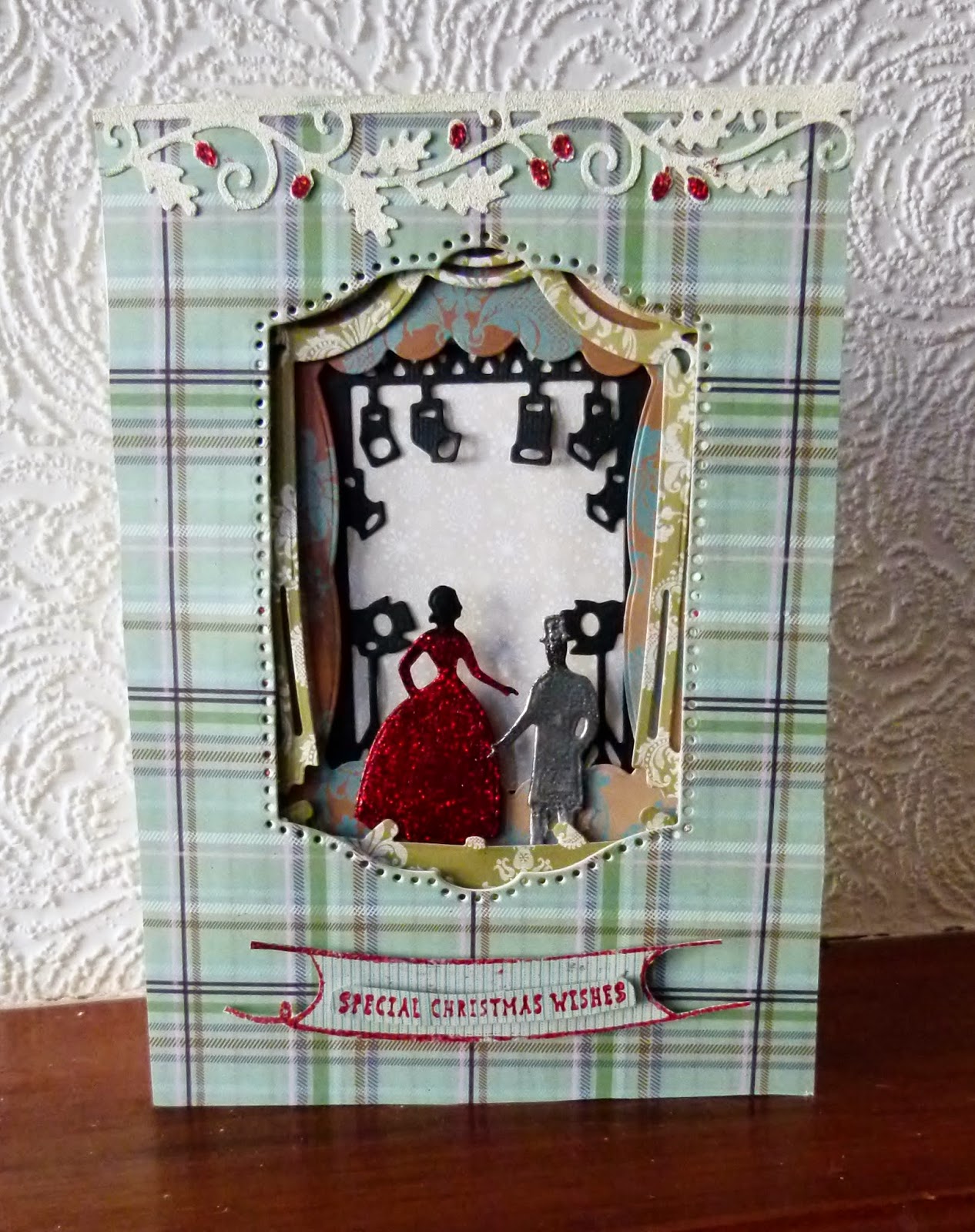
 Here is the Theatre Shadow box die, and this can be adapted in several ways. I have used Papermania embossing powder on the characters to give them a festive feel. You can either cut away a  section of the card to add dimension or layer the different cut outs on top of each other and then adhere it to the card. the dies can be layered up in any order and can be combined with each other.

 I used a Marianne ballerina die to customise this congratulations card which was made with the Capsule Collection Eau de Nil and Parisanne Blue papers.
I used the vintage download papers off the creativity club to create this card.

The Street Scene Die can be used for all occasions, here I used the capsule collection spots and stripe jewel range to create this candy cane village. But you could use dark  colours and adapt it into an Halloween card.


The Fun Fair die is my favourite one so far and can be used with different colours to create cards for different occasions. for this one I used the Daisy Blue digital downloads.

I will be back later with a demonstration on how you can used these dies on a layout.